Model Context Protocol tools
The Model Context Protocol (MCP) is an open standard for connecting generative AI models to external data sources, tools, and systems. Think of it as a universal connection mechanism that simplifies how LLMs obtain context, execute actions, and interact with various systems.
Core architecture and concepts
MCP follows a client-server architecture, defining how data or resources, interactive templates or prompts, and actionable functions or tools are exposed by an MCP server and consumed by an MCP client, which could be an LLM host application or an AI agent. In ADK, you use the McpToolset class as an interface between MCP Servers and ADK agents. It is also possible to configure an ADK server as an MCP server for use by other client systems.
sequenceDiagram
    autonumber
    participant Agent as ADK LlmAgent (Client)
    participant Toolset as McpToolset
    participant Server as MCP Server

    Agent->>Toolset: Initialize connection
    Toolset->>Server: Protocol Handshake & Tool Discovery (list_tools)
    Server-->>Toolset: Available Tool Schemas
    Toolset-->>Agent: Adapted ADK Tools

    Agent->>Toolset: Call Tool (arguments)
    Toolset->>Server: Execute Tool (call_tool via Stdio/HTTP)
    Server-->>Toolset: Execution Result (Text/JSON)
    Toolset-->>Agent: Result returned to LLM
Prerequisites and setup rules
Before you begin, ensure you have the following set up:
- ADK Installed: Complete standard ADK setup in your project environment with the MCP extra:
pip install "google-adk[mcp]". - Runtime Requirements: Python 3.10+ or Java 17+.
- Node.js &
npx(Python/TS only): Required to run npm-packaged community MCP servers. - Verify installations: Confirm
adkandnpxare in your PATH in the activated virtual environment:
Deployment rule
Agents deployed to production must define McpToolset synchronously in agent.py. Dynamic asynchronous agent initialization is only supported for local debugging or custom standalone runners.
Understand uses and integrations
There are three main integration patterns. The direct integration is covered in this page and the other implementations are covered in their specific pages.
- Direct MCP Tool Integration: When an ADK agent acts as an MCP client using
McpToolset. - Agent-Exposed MCP Server: When you build an MCP server that wraps ADK Tools using
to_mcp_server. - Specialized Sub-Agent Delegation: When an agent delegates to a sub-agent using
AgentTool.
MCP Implementation options
When you start building with the Model Context Protocol (MCP) and ADK, these key architectural differences will help you design more stable and efficient agents. The following table works as a comparative guide to help you construct those agents.
| Dimension | Direct MCP Tool Integration (McpToolset) |
Agent-Exposed MCP Server (to_mcp_server) |
Specialized Sub-Agent Delegation (AgentTool) |
|---|---|---|---|
| Architecture | External server process or remote service providing deterministic endpoints adapted into the primary LlmAgent tool list. |
An autonomous ADK agent compiled into an MCP server, callable by external clients (Claude Code, IDEs, external hosts). | In-process, hierarchical agent encapsulation where a parent agent invokes a child LlmAgent as a callable tool. |
| Context Window Impact | High Context Bloat: Every tool definition and raw output, for example: database rows or file blobs, enters the primary agent's history. | Isolated: The external caller only receives the final aggregated response text/blocks. | Zero Context Bloat: Intermediate exploratory reasoning, failed tool calls, and large raw outputs remain isolated in the sub-agent loop. |
| AI Model Load and Tiering | Single model must understand all tool schemas, validation constraints, and workflow state simultaneously. | Independent model reasoning dedicated solely to the wrapped task. | Enables model tiering, for example: gemini-2.5-pro for orchestrator, and gemini-2.5-flash for sub-agent tool execution with dedicated system instructions. |
| Latency & Token Cost | Lower Cost & Predictable Latency: 1 LLM turn + 1 deterministic tool invocation + 1 response generation turn. | Client-driven; latency depends on internal agent execution depth. | Higher Cost & Variable Latency: Multiple LLM calls, sub-agent reasoning turns before returning to parent. |
| Ideal Use Cases |
|
|
|
State restoration
While ADK agents preserve session state during lifecycle events, they do not automatically re-establish active MCP connections upon restoration. Agents re-initialize connections as needed.
Direct MCP Tool integration (McpToolset)
The McpToolset class can be directly added to your agent's tools list; this class enables seamless connection to an MCP server, discovery of its tools, and making them available for your agent to use. On initialization, McpToolset establishes and manages the connection to the MCP server. It also handles graceful connection shutdown when the agent or process terminates.
Use McpToolset to import tools from an external MCP server into your ADK LlmAgent.
Example: Local Stdio Transport (FileSystem MCP)
This example sets up an ADK agent that connects to a local MCP file system server; it instantiates the McpToolset directly within the agent's tools list to enable file management capabilities.
Step 1. Define your agent with McpToolset:
import os
from google.adk.agents import LlmAgent
from google.adk.tools.mcp_tool import McpToolset
from google.adk.tools.mcp_tool.mcp_session_manager import StdioConnectionParams
from mcp import StdioServerParameters

TARGET_FOLDER = os.path.abspath("./accessible_files")

root_agent = LlmAgent(
    model="gemini-flash-latest",
    name="filesystem_assistant",
    instruction="Help users manage local files.",
    tools=[
        McpToolset(
            connection_params=StdioConnectionParams(
                server_params=StdioServerParameters(
                    command="npx",
                    args=["-y", "@modelcontextprotocol/server-filesystem", TARGET_FOLDER],
                ),
            ),
            # Optional: Select specific tools exposed to the agent
            tool_filter=["list_directory", "read_file"],
        )
    ],
)
Step 2: Package and Run your Agent to make your agent discoverable to ADK and start interacting with it, follow this workflow:
- Initiate your package: Create an
__init__.pyfile in the same directory as your agent.py. This step is required for ADK to recognize your agent. -
Launch the Web Interface:
-
Interact with the Agent: select
filesystem_assistantfrom the drop-down menu and prompt the Agent with commands: List files in the current directory or What is the content of another_file.md?
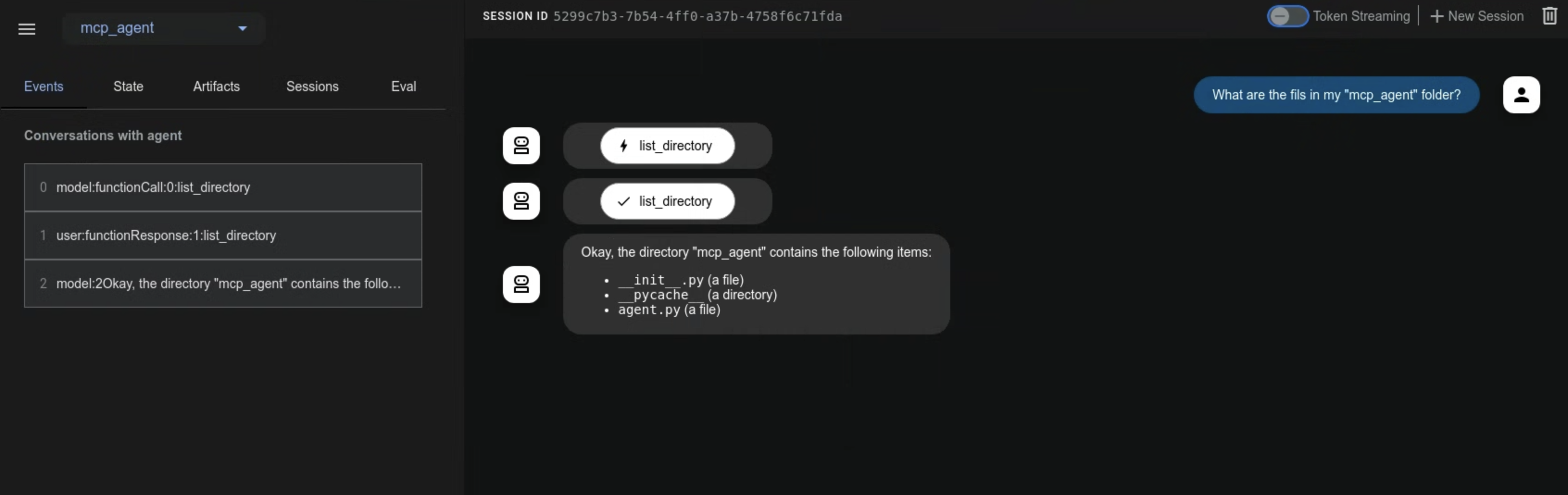 ```
```
import { LlmAgent, MCPToolset } from "@google/adk";
import path from "path";

const TARGET_FOLDER = path.resolve("./accessible_files");

export const rootAgent = new LlmAgent({
    model: "gemini-flash-latest",
    name: "filesystem_assistant",
    instruction: "Help users manage local files.",
    tools: [
        new MCPToolset({
            type: "StdioConnectionParams",
            serverParams: {
                command: "npx",
                args: ["-y", "@modelcontextprotocol/server-filesystem", TARGET_FOLDER],
            },
        }, ["list_directory", "read_file"]) // Optional tool filter array
    ],
});
package agents;

import com.google.adk.agents.LlmAgent;
import com.google.adk.tools.mcp.McpToolset;
import com.google.adk.tools.mcp.StdioServerParameters;
import java.util.List;

public class FileSystemAgentCreator {
    public static void main(String[] args) throws Exception {
        StdioServerParameters serverParams = StdioServerParameters.builder()
                .command("npx")
                .args(List.of("-y", "@modelcontextprotocol/server-filesystem", "/absolute/path/to/folder"))
                .build();

        try (McpToolset toolset = new McpToolset(serverParams.toServerParameters())) {
            LlmAgent agent = LlmAgent.builder()
                    .model("gemini-flash-latest")
                    .name("filesystem_assistant")
                    .instruction("Help users access their file systems.")
                    .tools(toolset)
                    .build();

            System.out.println("Agent initialized: " + agent.name());
        }
    }
}
package main

import (
    "context"
    "fmt"
    "os/exec"

    "github.com/modelcontextprotocol/go-sdk/mcp"
    "google.golang.org/adk/v2/agent"
    "google.golang.org/adk/v2/agent/llmagent"
    "google.golang.org/adk/v2/model/gemini"
    "google.golang.org/adk/v2/tool"
    "google.golang.org/adk/v2/tool/mcptoolset"
)

func createFilesystemAgent(ctx context.Context) (agent.Agent, error) {
    // 1. Initialize MCP Toolset with CommandTransport and AllowedToolsPredicate
    mcpTools, err := mcptoolset.New(mcptoolset.Config{
        Transport: &mcp.CommandTransport{
            Command: exec.Command("npx", "-y", "@modelcontextprotocol/server-filesystem", "./accessible_files"),
        },
        ToolFilter: tool.AllowedToolsPredicate([]string{"list_directory", "read_file"}),
    })
    if err != nil {
        return nil, fmt.Errorf("failed to create mcp toolset: %w", err)
    }

    // 2. Initialize Gemini model.LLM instance
    llm, err := gemini.NewModel(ctx, "gemini-2.0-flash", nil)
    if err != nil {
        return nil, fmt.Errorf("failed to create gemini model: %w", err)
    }

    // 3. Create the LLM agent returning agent.Agent
    return llmagent.New(llmagent.Config{
        Name:        "filesystem_assistant",
        Model:       llm,
        Instruction: "Help users manage local files.",
        Toolsets:    []tool.Toolset{mcpTools},
    })
}

func main() {
    ctx := context.Background()
    ag, err := createFilesystemAgent(ctx)
    if err != nil {
        panic(err)
    }
    fmt.Printf("Successfully created agent: %s\n", ag.Name())
}
Example: Remote HTTP / SSE Transport (Google Maps Grounding Lite)
Before starting, follow the instructions for Google Maps Grounding Lite to enable the service on your Google Cloud project and generate your Maps Platform API Key. Unlike the previous local process example, this pattern connects your agent to a remote, cloud-hosted MCP server using Server-Sent Events (SSE). It uses the Google Maps Grounding Lite service to demonstrate how to pass authentication headers, such as an API key, to a scalable endpoint.
Step 1: Define your agent with McpToolset.
import os
from google.adk.agents import LlmAgent
from google.adk.tools.mcp_tool import McpToolset
from google.adk.tools.mcp_tool.mcp_session_manager import StreamableHTTPConnectionParams

API_KEY = os.getenv("GOOGLE_MAPS_API_KEY")

root_agent = LlmAgent(
    model="gemini-flash-latest",
    name="travel_planner",
    instruction="Plan travel routes and search locations using Google Maps.",
    tools=[
        McpToolset(
            connection_params=StreamableHTTPConnectionParams(
                url="https://mapstools.googleapis.com/mcp",
                headers={
                    "X-Goog-Api-Key": API_KEY,
                    "Content-Type": "application/json",
                    "Accept": "application/json, text/event-stream",
                },
                timeout=5,
                sse_read_timeout=300
            )
        )
    ],
)
adk web, set you Google API key in your terminal
Step 3: Run adk web: Navigate to the parent directory of mcp_agent and launch the web Interface.
Step 4: Interact with the UI:
- Select travel_planner from the drop-down.
- Try prompts such as: I will be in San Francisco tomorrow. What's the weather like or Find coffee shops near Golden Gate Park
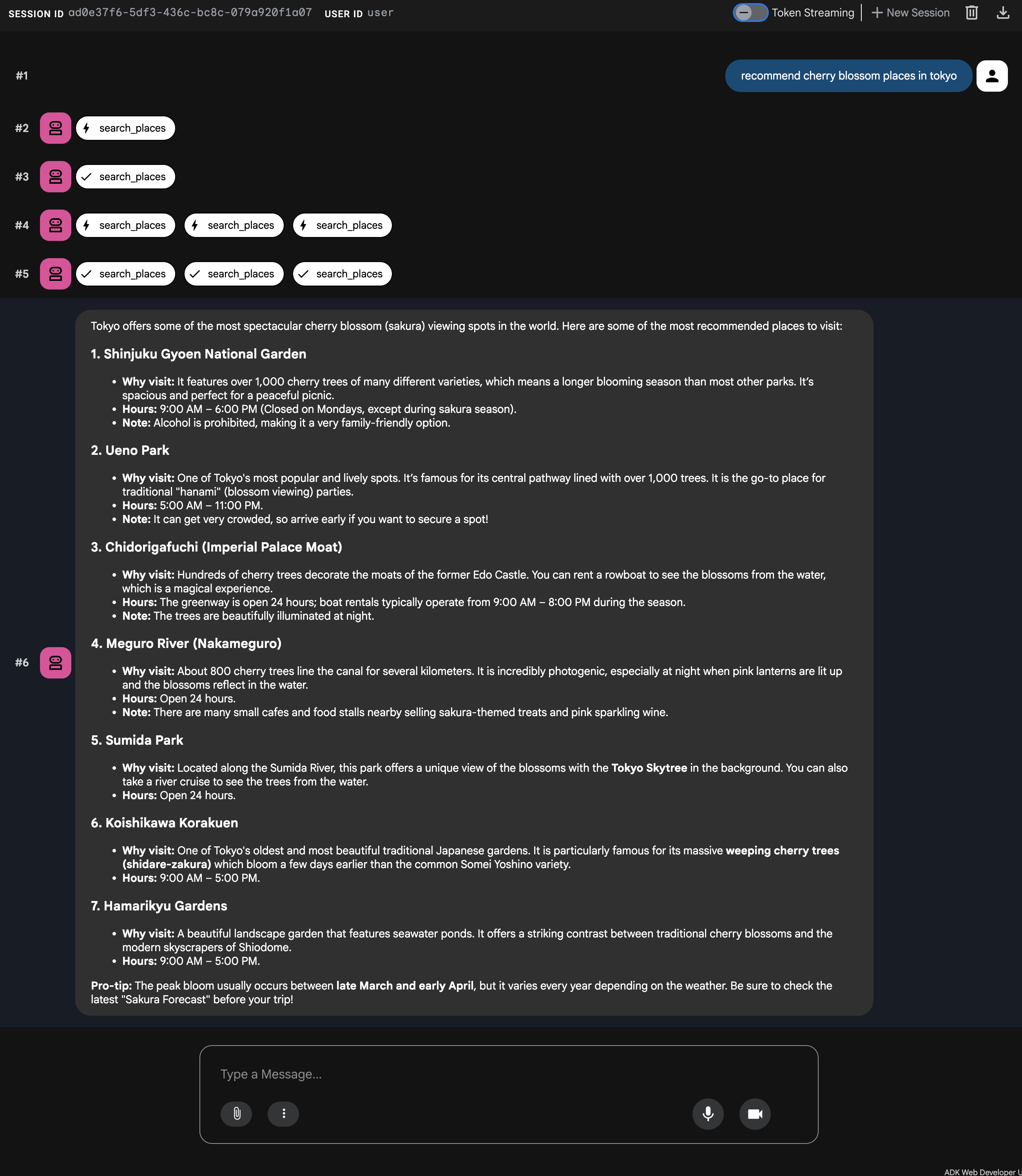
```typescript import { LlmAgent, MCPToolset } from "@google/adk";
export const rootAgent = new LlmAgent({ model: "gemini-flash-latest", name: "travel_planner", instruction: "Plan travel routes and search locations using Google Maps.", tools: [ new MCPToolset({ type: "StreamableHTTPConnectionParams", url: "https://mapstools.googleapis.com/mcp", transportOptions: { requestInit: { headers: { "X-Goog-Api-Key": process.env.GOOGLE_MAPS_API_KEY!, "Content-Type": "application/json", "Accept": "application/json, text/event-stream", }, }, }, timeout: 5, sseReadTimeout: 300, }), ], }); ```
Remote MCP Authentication and resource access
This section shows you how to connect to remote MCP servers using authentication and how to read data Resources exposed by an MCP server. When an MCP server requires authentication, such as over Server-Sent Events SseConnectionParams or Streamable HTTP, McpToolset handles credential injection and token management automatically.
Key authentication parameters
| Parameter | Type | Description |
|---|---|---|
auth_scheme |
AuthScheme |
The authentication strategy (e.g., Bearer, Basic, APIKey, OAuth2). |
auth_credential |
AuthCredential |
The secret credential payload, for example, API token, OAuth access token, username/password. |
ADK automatically constructs the required Authorization HTTP headers and manages OAuth 2.0 token refreshes during client requests.
Configure authentication
When an MCP server requires authentication, McpToolset handles credential injection and token management automatically. Use the native auth_scheme and auth_credential parameters rather than manually injecting HTTP headers.
For general ADK authentication patterns, see our Custom Tools Authentication Guide
import os
from google.adk.tools.mcp_tool import McpToolset
from google.adk.tools.mcp_tool.mcp_session_manager import SseConnectionParams

# Configure Bearer Token Authentication via headers
toolset = McpToolset(
    connection_params=SseConnectionParams(
        url="https://mcp-server.example.com/sse",
        headers={"Authorization": f"Bearer {os.getenv('MCP_AUTH_TOKEN')}"},
        timeout=5,
    )
)
import { MCPToolset } from "@google/adk";

// Configure Bearer Token Authentication via headers
const toolset = new MCPToolset({
    type: "StreamableHTTPConnectionParams",
    url: "https://mcp-server.example.com/sse",
    transportOptions: {
        requestInit: {
            headers: {
                "Authorization": `Bearer ${process.env.MCP_AUTH_TOKEN}`,
            },
        },
    },
    timeout: 5,
});
Accessing MCP Resources
In addition to executable Tools, MCP servers can expose Resources data files, database records, or API context blobs.
McpToolset provides two core methods to discover and read these data resources:
Core Methods
list_resources(): Returns a list of all available data resources exposed by the MCP server.read_resource(name): Retrieves the raw content blocks, text or binary data, for a specific resource by its name or URI.use_mcp_resources=True(Configuration): When initializingMcpToolset, setting this flag automatically equips the LLM agent with theLoadMcpResourceTool. This allows the agent to dynamically discover and read resources on its own without requiring manual programmatic fetching.
Try it out
  import asyncio

  async def fetch_mcp_data(toolset):
      # 1. Discover available resources on the server
      resources = await toolset.list_resources()
      print("Available Resources:", resources)

      # 2. Read content from a specific resource
      if resources:
          resource_name = resources[0]
          content_blocks = await toolset.read_resource(name=resource_name)
          print(f"Content of {resource_name}:", content_blocks)
  async function fetchMcpData(toolset: any) {
      // 1. Discover available resources
      const resources = await toolset.listResources();
      console.log("Available Resources:", resources);

      // 2. Read a specific resource
      if (resources.length > 0) {
          const content = await toolset.readResource(resources[0]);
          console.log(`Content of ${resources[0]}:`, content);
      }
  }
Troubleshooting & Best Practices Checklist
- Security & Scoping: Always supply
tool_filter=[...]inMcpToolsetto expose only necessary actions to your LLM. - Timeouts: Configure explicit timeouts on
StdioConnectionParams(timeout=5)to prevent hanging subprocesses. - Lifecycle Cleanup: In non-
adk webrunners, invokeawait toolset.close()or use async context managers to gracefully shutdown subprocesses. - Environment Detection: Dynamically pick connection types based on environment variables, for example:
K_SERVICEfor Cloud Run vs Stdio for local dev.
Configure the environment-aware connection
import os
from google.adk.tools.mcp_tool import McpToolset
from google.adk.tools.mcp_tool.mcp_session_manager import (
    StdioConnectionParams,
    StreamableHTTPConnectionParams,
)
from mcp import StdioServerParameters

if os.getenv("K_SERVICE"):
  # Running in Production (Cloud Run)
  # Uses Streamable HTTP for stateless scalability and bearer auth headers
  mcp_toolset = McpToolset(
      connection_params=StreamableHTTPConnectionParams(
          url=os.getenv("REMOTE_MCP_URL"),
          headers={"Authorization": f"Bearer {os.getenv('MCP_AUTH_TOKEN')}"},
          timeout=5,
          sse_read_timeout=300,
      )
  )
else:
  # Running in Local Development
  # Uses Stdio Subprocess IPC for zero-network latency testing
  mcp_toolset = McpToolset(
      connection_params=StdioConnectionParams(
          server_params=StdioServerParameters(
              command="npx",
              args=["-y", "@modelcontextprotocol/server-filesystem", "/tmp"],
          ),
          timeout=5,
      )
  )
Further resources
Once you understand the basics, explore Advanced use cases for complex implementations and custom integrations.