MLflow AI Gateway for ADK agents
MLflow AI Gateway is a database-backed LLM proxy built into the MLflow tracking server (MLflow ≥ 3.0). It provides a unified OpenAI-compatible API across dozens of providers, including Gemini, Anthropic, Mistral, Bedrock, Ollama, and more, with built-in secrets management, fallback/retry, traffic splitting, and budget tracking, all configured through the MLflow UI.
Since MLflow AI Gateway exposes an OpenAI-compatible endpoint, you can connect ADK agents to it using the LiteLLM model connector.
Use cases
- Multi-provider routing: Switch LLM providers without changing agent code
- Secrets management: Provider API keys stored encrypted on the server; your application sends no provider keys
- Fallback & retry: Automatic failover to backup models on failure
- Budget tracking: Per-endpoint or per-user token budgets
- Traffic splitting: Route percentages of requests to different models for A/B testing
- Usage tracing: Every call logged as an MLflow trace automatically
Prerequisites
- MLflow version 3.0 or newer
- Google ADK and LiteLLM installed in your environment
Setup
Install dependencies:
Start the MLflow server:
The MLflow UI will be available at http://localhost:5000.
Create a gateway endpoint by navigating to the MLflow UI at
http://localhost:5000, then go to AI Gateway → Create Endpoint. Select a
provider (e.g., Google Gemini) and model (e.g., gemini-flash-latest), and
enter your provider API key, which is stored encrypted on the server.
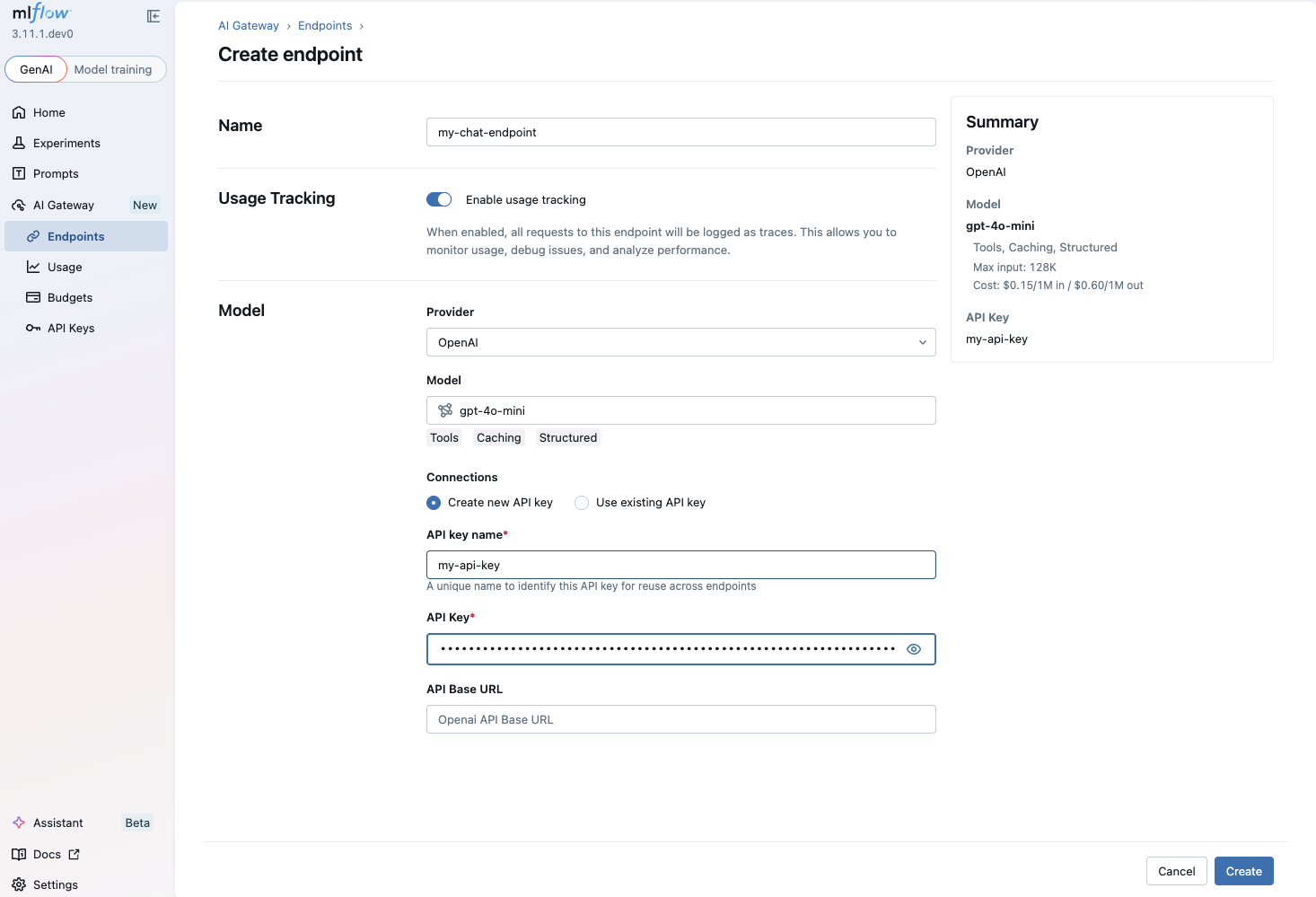
See the MLflow AI Gateway documentation for more details on endpoint configuration.
Use with agent
Use the LiteLlm wrapper with api_base pointing to the MLflow Gateway's
endpoint. The model parameter should use the openai/ prefix followed by your
gateway endpoint name.
from google.adk.agents import LlmAgent
from google.adk.models.lite_llm import LiteLlm

# Point to MLflow AI Gateway endpoint.
# "my-chat-endpoint" is the endpoint name you created in the MLflow UI.
agent = LlmAgent(
    model=LiteLlm(
        model="openai/my-chat-endpoint",
        api_base="http://localhost:5000/gateway/openai/v1",
        api_key="unused",  # provider keys are managed by the MLflow server
    ),
    name="gateway_agent",
    instruction="You are a helpful assistant powered by MLflow AI Gateway.",
)
You can swap the underlying LLM provider at any time by reconfiguring the gateway endpoint in the MLflow UI with no code changes required in your ADK agent.
Tips
- The
api_keyparameter is required by LiteLLM but not validated by the gateway. Set it to any non-empty string. - Behind a proxy or on a remote host, replace
localhost:5000with your server address. - Combine with MLflow Tracing for end-to-end observability of your ADK agents.
Resources
- MLflow AI Gateway Documentation: Official documentation for MLflow AI Gateway covering endpoint management, query APIs, and gateway features.
- MLflow Tracing for ADK: Set up observability for your ADK agents with MLflow Tracing.
- LiteLLM model connector: Documentation for the LiteLLM wrapper used to connect ADK agents to compatible endpoints.